Your First Three Autopilot Rotas, and What You Get Back
Don't switch autopilot to "publish on its own" on day one. Put one team on the first level, where it plans and checks and you press Publish, and use its first three rotas as a test. You'll know after three periods whether the drafts are good enough to trust, and you'll have your own numbers instead of ours.
The first post in this series showed what a late rota costs. The second explained how autopilot works. This one is the rollout: what to look at in each of the first three periods, and how to measure what changed.

Rota 1: plan it, you publish
Set one team to "Plan it, I publish". Wishes open on schedule, the crew is asked and reminded, and at the deadline the plan appears with the checks already run. You press Publish.
Your only job is to compare. Open the draft next to the one you would have built, and for each shift you would have done differently, write down what you changed and why. Keep this list. There are only three kinds of reason:
| Why you would change it | What it means |
|---|---|
| The plan broke a rule you hold but haven't entered | A rule is missing. Add it to the team, and the next plan follows it. |
| The plan didn't know something | Availability, a qualification or contract hours is out of date. Fix the record. |
| You'd just prefer it | A preference of yours, not a rule. Decide whether it deserves to be one. |
Only the third kind is a reason to keep editing by hand. The first two get fixed at the source, so the next draft doesn't need the same change. Remember that if you edit a draft by hand, re-planning replaces your edits, so finish the record fixes before you re-plan, not after.
Rota 2: publish when I say yes
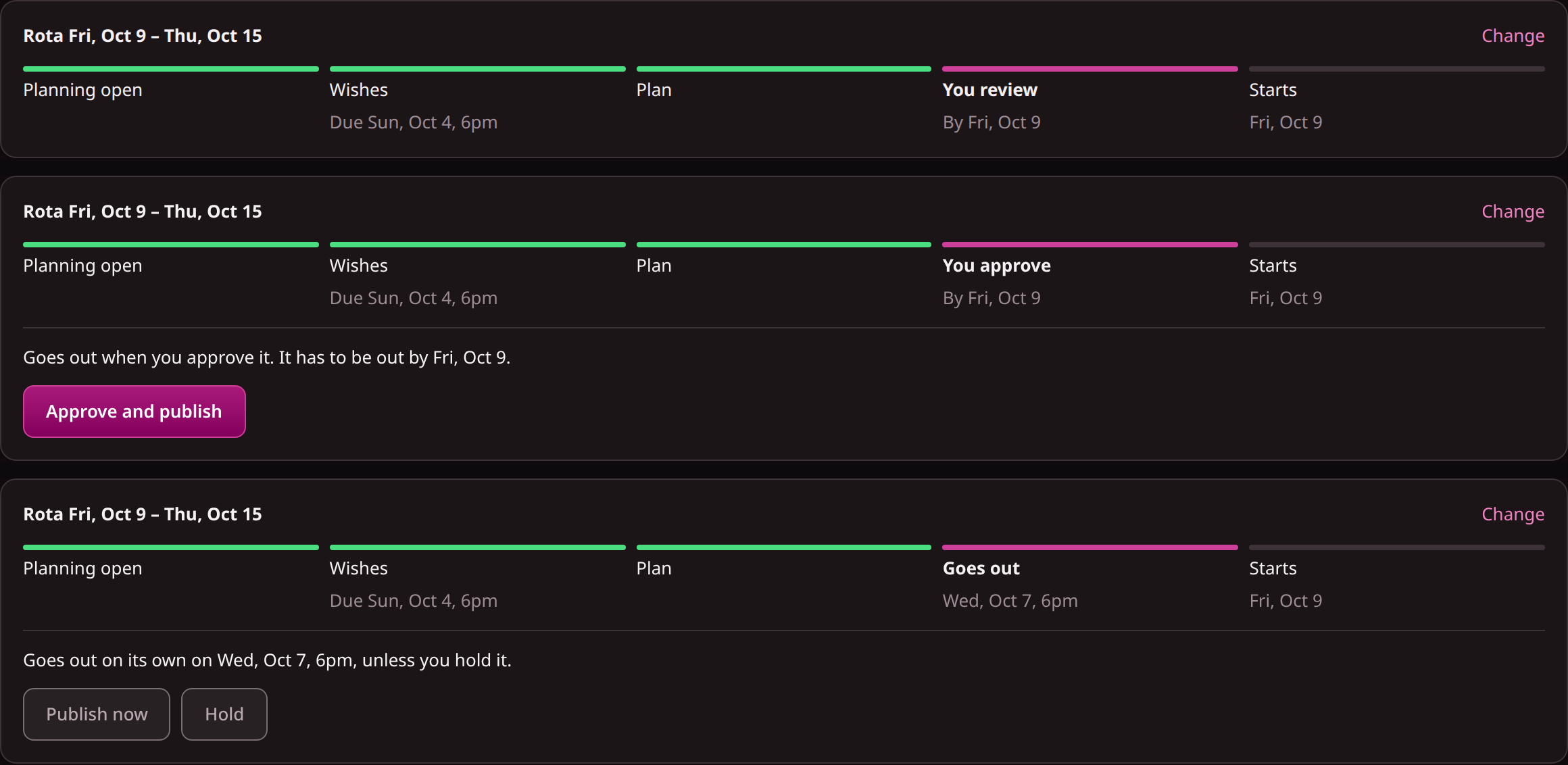
If rota 1 needed few changes, move up one level. Now the draft comes to you, and nothing goes out without your yes. If you don't answer, it waits, and the strip shows the latest day it has to be out.
Look at what stopped it, if anything. A stopped rota gives you its reason in plain words: a rule break somebody could not legally work, more medium issues than you allow, or fewer wishes met than the minimum you set. Those reasons are the most useful thing this period gives you. A reason that comes up twice is a rule or a record to fix, as before.
This is also the period to turn on the two decisions that happen after publication: time-off requests that answer themselves when there's no impact, and cover rounds for sick calls. Do one at a time so you know which one changed your week.
Rota 3: publish on its own
If the first two periods needed few or no changes, let it publish on its own for the third. Keep the Hold button in mind: you can stop any rota before it goes out. If you do nothing and it breaks no rule, it goes out at 6pm on the publish date, the crew is told, and the shifts nobody could fill are posted to the team as open shifts.
You haven't given up control, because the three things that matter stay with you:
- A rule break never goes out by itself.
- A rota you changed by hand waits for you.
- Anything that would leave a shift short comes to you.
The scorecard: what to write down each period
The only way to know whether this worked is a few numbers written down while you do it. Seven measures per period, and what each one tells you:
| Measure | What it tells you |
|---|---|
| Level it ran at | Which setting the other numbers belong to |
| Shifts you changed by hand | How close the plan was to what you would have built |
| Reason for each change (rule, record or preference) | Whether to fix a rule, fix a record, or leave it |
| Hours you spent on the rota | What you set out to cut |
| Days between publication and start | The notice your crew actually got |
| Share of the crew who answered before the deadline | Whether wishes are asked for early enough |
| Sick-call shifts filled by cover rounds | Whether rounds do real work for you (only if you turned them on) |
Copy this once per period:
Rota (dates):
Level:
Shifts changed by hand:      ___   (rule ___ / record ___ / preference ___)
Hours I spent:               ___
Days of notice (published to start): ___
Crew who answered in time:   ___ of ___
Sick-call shifts filled by rounds:   ___
The measures that matter most are the changes by hand and the hours spent. Fewer changes by hand means your rules and records are complete enough for the plan to follow, and the hours spent are what you set out to cut.
What you get back, and how to say it
Take the hours from the first post's arithmetic: what a period cost you before. Compare with the hours in your scorecard. The example uses the made-up figures from post 1 and an assumed one hour of reviewing per period. It shows how to do the sum, and it is not a result anyone should expect.
Before: 6 hours a period × 13 periods × 3 teams = 234 hours a year. After, at an assumed 1 hour a period: 1 × 13 × 3 = 39 hours.
Hours aren't the whole result, and they may not be the biggest. Notice is the other: if the gap between publication and start goes from three days to seven, the crew gets four more days to plan around the rota. And the share of the crew who answered in time tells you whether people are being asked early enough.
Check the notice figure against your own rule. If you write a notice period into your rules, autopilot plans the dates backwards from it, so a rota is ready in time for it. That doesn't make a rota late-proof: a crew who answer after the deadline are planned around without their wishes, and a rota that stays blocked up to the last day goes out with open shifts.
Who should not bother
A small team, one person and twenty minutes a period, gets little back. A site where availability changes daily and nobody enters it will get plans that are only as good as that record, so fix the record first. And if the rule that decides who may work a shift lives only in someone's head, write it down before autopilot can follow it. Each of those is useful work even if you never turn autopilot on.
Your next step
Pick one team, fill in the setup sheet from the previous post, and put it on "Plan it, I publish" for one period. Write down your changes in the three columns above. You can read what each setting does on the automatic rostering page.