How Rota Autopilot Plans, Checks and Publishes
In the last post we wrote the rota's calendar backwards from its start date: when wishes open, when they close, when the rota must be out. Autopilot is that calendar, running by itself. You answer three questions for a team, and from then on every period follows the dates.
Here is what the three questions are, what happens each period, and the short list of things it will not do.

The three questions
You answer them once per team, in a single panel, and each team can have its own answers.
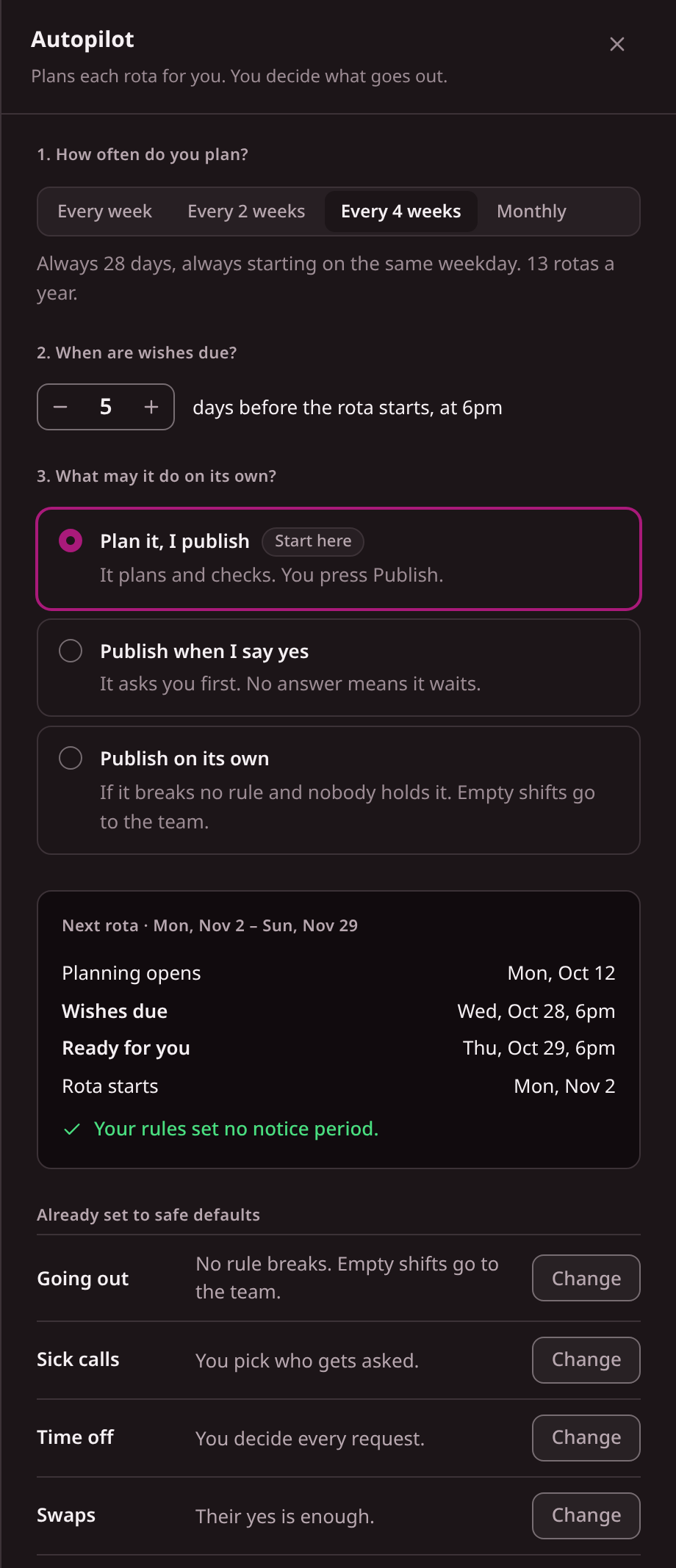
1. How often do you plan? Every week, every 2 weeks, every 4 weeks or monthly. Week-based rotas run Monday to Sunday. A 4-week rota is always 28 days starting on the same weekday, which makes 13 a year. Monthly runs from the 1st to the last day, 12 a year.
2. When are wishes due? A number of days before the rota starts, always at 6pm. The default is 5.
3. What may it do on its own? Three levels:
| Level | What it does | Use it when |
|---|---|---|
| Plan it, I publish | Plans and checks. You press Publish. | You haven't seen its rotas yet. This is the suggested start. |
| Publish when I say yes | Asks you first. No answer means it waits. | Its drafts rarely need changes. |
| Publish on its own | Goes out at 6pm on the publish date if it breaks no rule and nobody holds it. Empty shifts go to the team. | You have watched several rotas go out unchanged. |
Below the three questions sits a timeline for the next rota, and it checks it against your own notice rule. If the wishes would close too late for the rota to go out in time, it says so before you save, with a "Fix it for me" button. You find out that the dates don't work when you set them, not when a rota is late.
What happens each period
Take a 4-week rota with the defaults. Day 0 is the first day of the period.
| When | What happens |
|---|---|
| Day −21 | The next rota opens. The crew gets a push asking for their wishes. One tap confirms nothing has changed, and anyone who has not answered is reminded. |
| Day −8, 9am | A reminder goes to anyone who hasn't answered (three days before the deadline). |
| Day −6, 9am | A second reminder (one day before). |
| Day −5, 6pm | Wishes close. Autopilot plans the period from what everyone asked for. |
| Day −4, 6pm | At the third level it goes out, and everyone on it is told. At the second it waits for your yes, at the first it is ready for you. |
| Day 0 | The rota starts. |
The 21 days, the two reminders and the 24-hour review between planning and going out are defaults, not choices the panel asks you for.
flowchart TB
  A[Rota opens, crew asked] --> B[Reminders to anyone who hasn't answered]
  B --> C[Wishes close at 6pm]
  C --> D[Planned and checked]
  D --> E{Rule break?}
  E -->|no| F[Goes out, or waits for your yes]
  E -->|yes| G[Stops and tells you]
What it checks, and what always stops it
The plan takes in cover, availability, wishes, qualifications, contract hours and the working-time rules you set for the team. Then a rule break stops it, always. A rota that somebody may not be allowed to work never goes out without a person, at any level. That is fixed, not a setting.
You can add two optional limits for it to publish by itself: a minimum share of wishes met, and a maximum number of medium issues. If a draft misses either, it stops and tells you why, in plain words ("Only 80% of wishes met, below your 90%").
Three more situations are decided in advance:
- You changed the rota by hand. It won't go out on its own. It waits for you, and says so. Re-planning replaces changes made by hand, so the panel warns you before you do it.
- You press Hold. On the third level you can hold any rota until you let it go.
- It is still blocked on the last day your notice rule allows. At the third level, at 6pm on that day, it publishes the best version it can. Shifts that would break a rule are taken off and posted as open shifts for the team, and you're told which. A rule break itself never goes out.
After the rota is out
A rota is a plan that meets Tuesday. Two things reopen it, and autopilot handles the common cases.
A sick call. The shift reopens. With cover rounds on, it is offered to a few people at a time from those your rules allow, and the first yes takes it. The defaults are 3 people per round, 30 minutes per round, up to 3 rounds. If the shift is still open when it is two hours away, you get an email. Cover rounds are on by default only at the third level; at the other two, you pick who is asked. Change either in the same panel.
A leave request. Choose "approve if no impact" and a request answers itself when no shift would run short, no rule would break and the person's balance covers it. Anything else, you decide, and you're emailed.
Anything that would leave a shift short comes to you. That is the line it keeps: it handles the cases where the rules already give an answer.
Where it stops
It plans from the people and rules you've entered. If someone's availability is a month out of date, so is the plan. It cannot fill a shift nobody is free for; at the third level an empty shift is posted to the team as an open shift, and you hear about it. It doesn't calculate pay, and Fivexer checks the rules you configure, not whether your site meets a law or an audit. You also decide how much autonomy to give it, and the safest level is the one it suggests you start with.
Your setup sheet
Answer these for one team before you switch anything on. The example column is a worked example, not a recommendation.
| Question | Example (illustrative) | How to decide |
|---|---|---|
| Team | Packing line | Start with one team |
| How often do you plan? | Every 4 weeks | The cadence you already work to |
| Notice rule in days | 7 | The site's own rule |
| Wishes due, days before the start | 8 | At least notice plus 1 |
| What may it do alone? | Plan it, I publish | Start at the first level |
| Who gets the "it stopped" email? | The shift manager on the line | Someone who will read it that day |
| Are availability, contract hours and qualifications current? | Checked on the first of the month | Fix anything stale first |
| Sick calls: you pick, or rounds? | You pick, for now | Rounds once you trust its drafts |
The last three rows are what the plan is only as good as. If you can't answer them yet, that's your first job, and it helps even if you never use autopilot.
Put one team on "Plan it, I publish" and read its first draft against the one you would have built. How to judge that draft, when to move up a level and what to measure is the next post.
The automatic rostering page lists the same settings level by level.